In one sentence
Most systems let you tag an entire document as covering a standard. QFormance lets you map each heading to the clauses it satisfies — and that section-level mapping is what lets audits, gap analyses, and AI reason about your compliance position automatically.
- Mapping happens inside the editor, on each heading. There's no separate "compliance map" page.
- One heading can map to many clauses, even across multiple standards. A single SOP often satisfies ISO 9001, AS9100, and IATF clauses at once.
- The map is the input to Gap Analysis, audit-question context, and AI mapping suggestions. The deeper your map, the sharper everything downstream gets.
How to map a heading
Compliance Mapping lives inside the document editor. While writing or reviewing:
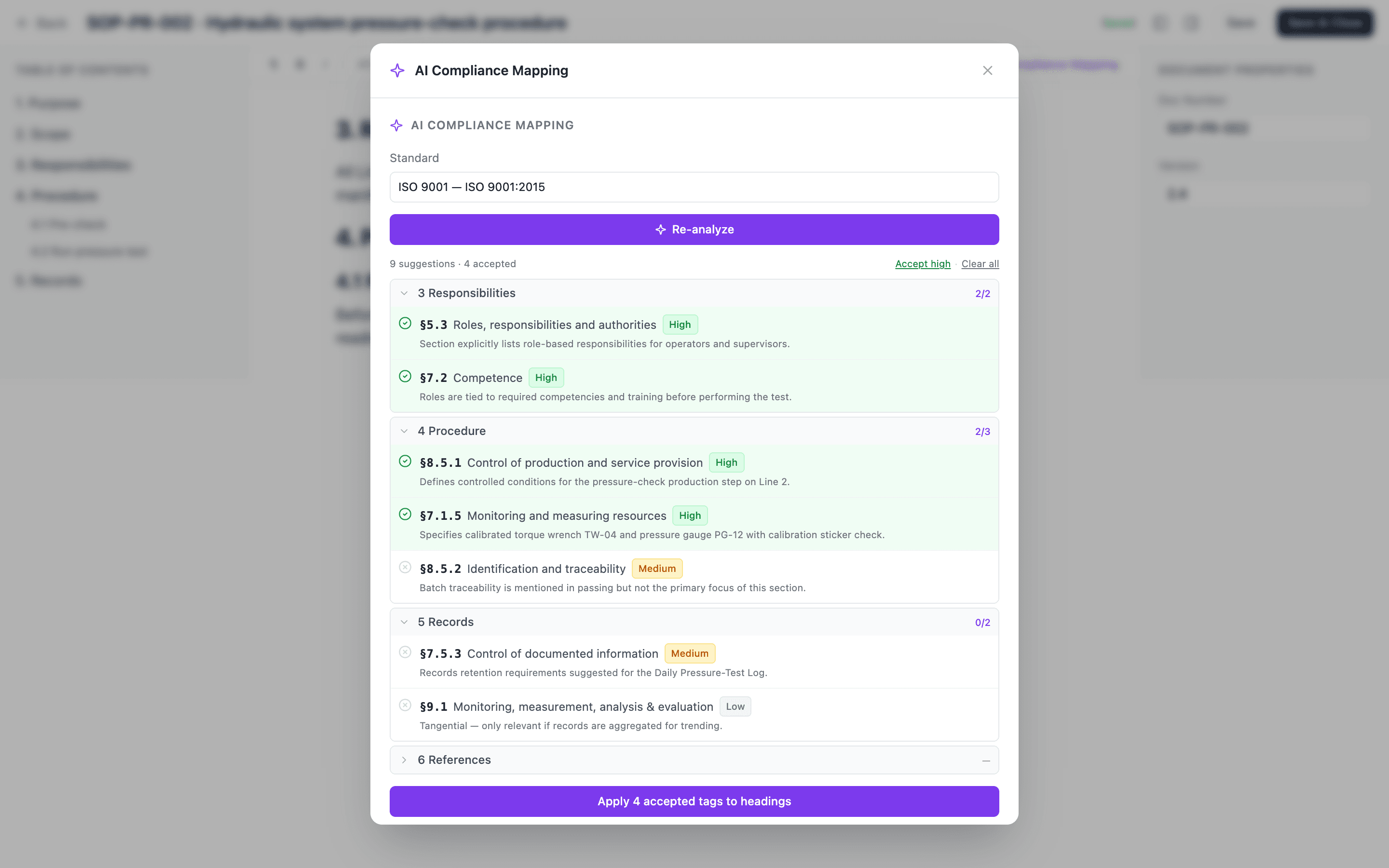
Click a heading to focus it.
Compliance Map in the toolbar opens the clause picker — only your active standards appear.
Colored badges appear on the heading once mapped. One color per standard, visible inline as you scroll.
The flow:
- Click on a heading.
- Click Compliance Map in the editor toolbar.
- Pick a standard from the picker. Only standards that are active for your org appear.
- Tick the clauses this heading satisfies.
- Repeat for any other standards the heading covers.
That's the whole interaction. A heading can have any number of badges across any number of standards.
Configuring active standards
The picker only shows standards that are turned on for your organization. Manage them at Admin → Regulatory Standards — enabling a standard makes it available for compliance mapping, audit question tagging, and gap analysis everywhere in the system.
If a standard is revised — ISO 9001:2015 → 2025, AS9100 Rev D → Rev E — don't hand-edit every mapped heading. The Migrate Standard admin tool walks you clause-by-clause through remapping references and rewrites your documents and audit questions in one pass. See Migrate a standard.
What the compliance map powers
The map isn't just decoration on the editor. It's the structural backbone that lets three other systems work without manual re-entry.
Audit questions inherit clause context
When an audit question is linked to a document section (via a topic in the Question Bank), it inherits the clauses on that section's heading. Auditors see which clause each question is probing, and findings carry the clause reference into NCRs automatically. The map does the bookkeeping; auditors do auditing.
Gap analysis fills itself in
The Auto-populate evidence links button in Gap Analysis scans your compliance map and instantly attaches every relevant document section to the matching clause in the assessment. What used to be a multi-day evidence hunt is the starting point — AI can then assess each clause against the attached evidence.
The quality of the AI's assessment is directly proportional to the depth of your map. Map well, and you get a defensible first-pass compliance score in minutes.
AI mapping suggestions
The AI panel on a document can run mapping in both directions:
- "Which clauses does this document cover that I haven't mapped yet?" — surfaces headings that should have a badge.
- "Which clauses in the standard does this document not address?" — surfaces gaps you should be aware of, even if your existing mapping is complete.
See AI in Documents for how to run those suggestions.
Building your compliance map
The map gets its value from depth. A few headings mapped won't power gap analysis well — but a fully mapped library means every audit, every gap analysis, and every AI run starts with the right context.
The order most teams find easiest:
- Start with the documents that matter most — SOPs and procedures that directly implement standard requirements. Map their headings during writing or first review.
- Run AI mapping suggestions to find headings you missed.
- Run Gap Analysis auto-populate to see what your existing map already proves.
- Map new documents at creation so the library stays current as it grows. Templates and routing rules can prompt authors before approval.
Retrospective mapping projects burn out. The trick is to bake mapping into the authoring habit — once or twice a week, the editor takes thirty extra seconds and the map grows naturally.
Where you see coverage
There's no dedicated "compliance map" page. Coverage shows up where it's useful:
- Document level — colored badges on every mapped heading in the editor and the printed/exported view.
- Gap Analysis level — the assessment grid shows which clauses have linked evidence and which are still gaps.
- Audit findings — clause references that came from the map, attached to the finding.
Related
- Document editor
- AI in Documents
- Gap analysis
- Audits
- Migrate a standard
- Record history and Signature manifestation — the Part 11 cluster
- Trash and Soft-delete
- Admin: Documents