In one sentence
The Approvals queue is one place for every item waiting for your sign-off — across modules, with the same up-to-3-step chain, and with delegation built in for when you're out of office.
- The same approval engine powers Documents, MOC, Exemptions, JHA, and FMEA. Same chain, same delegation rules, same audit trail.
- Approval happens on the record's own page, not in a modal — so you see the full context before signing off.
- There's no bulk-approve button. It's intentional. Approval is a legal act in a QMS; we don't make it casual.
My Approvals page
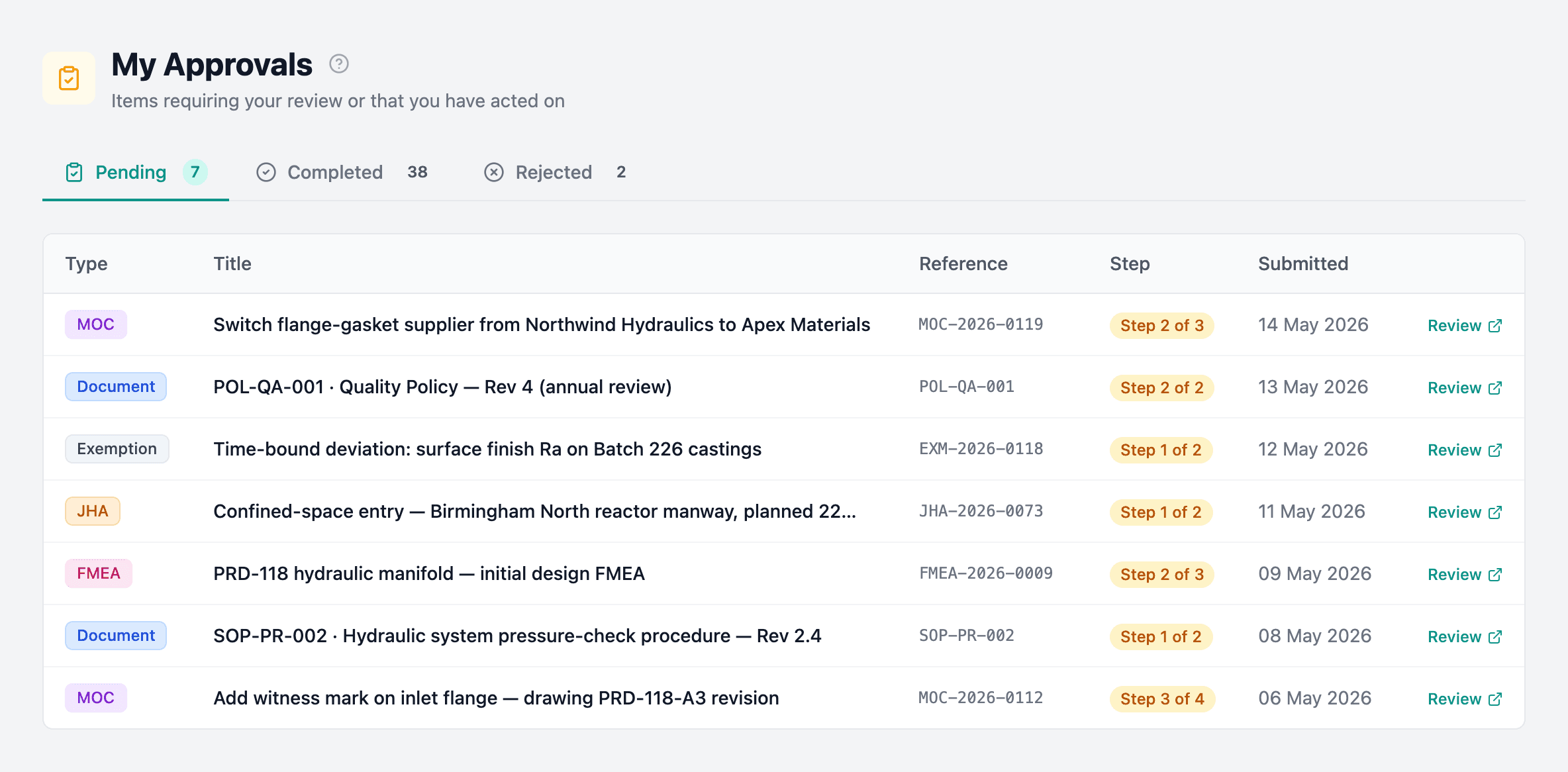
Three tabs:
- Pending — items waiting for your review.
- Completed — items you've approved.
- Rejected — items you've rejected.
Click Review on any pending item to jump to the record's detail page, where the full context plus the approve/reject controls live.
The approval workflow
Shared across MOC, Exemptions, JHA, FMEA, and Documents:
- Up to 3 serial approval steps.
- Approvers are set manually or auto-filled from routing rules.
- Each step must be approved before the next.
- Rejection returns the item to draft with a reason.
- Delegations can temporarily re-route any step.
Emergency approvals
MOC supports emergency approvals — these collapse to a single step (the highest-level approver only) so urgent changes can be routed fast. Emergency status and rationale are preserved in the audit trail and visible to oversight.
Step-up confirmation
If your organization has Require passkey for approvals turned on (set at Admin → Auth Policy), certain high-impact actions prompt for a fresh passkey confirmation before they proceed — including approving any step on a document, direct-publishing a patch revision, approving or closing an MOC, approving an exemption, approving a JHA or FMEA, and closing an NCR or a meeting. The confirmation lasts 5 minutes, so further sensitive actions in that window won't re-prompt.
The approver must have at least one passkey enrolled in their profile before the policy is turned on — otherwise the confirmation modal can't complete and the action is blocked. See Auth policy and Passkeys for setup.
Approving in context
Approvals happen on the entity's detail page, not in a modal in the Approvals list. The approval panel on each record shows:
- The full chain with per-step status and a current-step badge.
- Who approved each completed step, when, and any delegation notes.
- For the final step on a document — the revision type picker (Patch / Minor / Major).
- Approve / Reject buttons, with a rejection-reason field when rejecting.
- An approval comment field on modules that support it.
Delegations
Admin → Delegations manages delegations org-wide. Two flavors:
| Type | Who creates it |
|---|---|
| Admin-set | An admin can delegate anyone's approvals to anyone else for a date range (with a reason). |
| Self-set | Users can delegate their own approvals from their profile. |
While a delegation is active:
- Approvals route to the delegate.
- The approval panel shows delegate (on behalf of original) so the audit trail records who clicked approve and who was notionally responsible.
- A purple delegated badge appears on the step row.
Notifications
You're notified when:
- An item requires your approval (including items delegated to you).
- An approval step you're watching is completed.
- An item is fully approved or rejected.
No bulk approve
Each pending item opens separately — there's no "select all → approve".
Approval is a legal and QMS act. We deliberately don't make it casual. If you need faster throughput, lean on delegations for time-off, or routing rules to make sure the right person sees each item — not "select all → approve".