In one sentence
A JHA breaks a job into steps, lists the hazards each step carries, and pairs them with controls — scored on the same matrix as the rest of the QMS, with an approval workflow so the JHA is a real signed-off record, not a memo.
- Task-step focus. Other modules score risks at a higher level; the JHA is the only place each task step gets its own row.
- Five control types apply — Preventive, Detective, Corrective, Mitigating, Administrative. PPE shows up here more than anywhere else in the QMS.
- JHAs go through approval, and every approval snapshots a version. The signed-off steps, hazards, and controls are frozen into the Versions tab. Same chain mechanics as MOC and Documents.
For the matrix, control types, document linking, and the import-fork rules — every risk-scoring module shares them — see Risk fundamentals.
Creating a JHA
- Click New JHA from the list.
- Set title, description, location, and department.
- Assign an owner and set review dates.
JHAs scope to a single facility with multi-department support — see Facility & Department Scope.
The detail tabs
| Tab | What lives here |
|---|---|
| Overview | Summary card with access, scope, and headline scores |
| Details | Basic fields — including optional Client and Supplier pickers. Use the client picker when the job is performed for a customer, and the supplier picker when the job is subcontracted to a third party (service contractors, inspection vendors). Both are editable in place |
| Analysis | Hazard cards (the heart of the JHA) |
| Approvals | Set approvers and submit |
| Versions | Snapshot history — each full approval freezes the JHA's steps, hazards, and controls (appears once the JHA has at least one approved version) |
| Actions | Action items raised from this JHA |
| Attachments | Supporting files |
| Links | Connections to other modules — including a Linked Products card for tying the JHA to specific parts or equipment |
| Access | Per-record access control (if you have the capability) |
| History | The unified record-history feed — see Record history |
The Analysis tab
This is where the JHA actually lives.
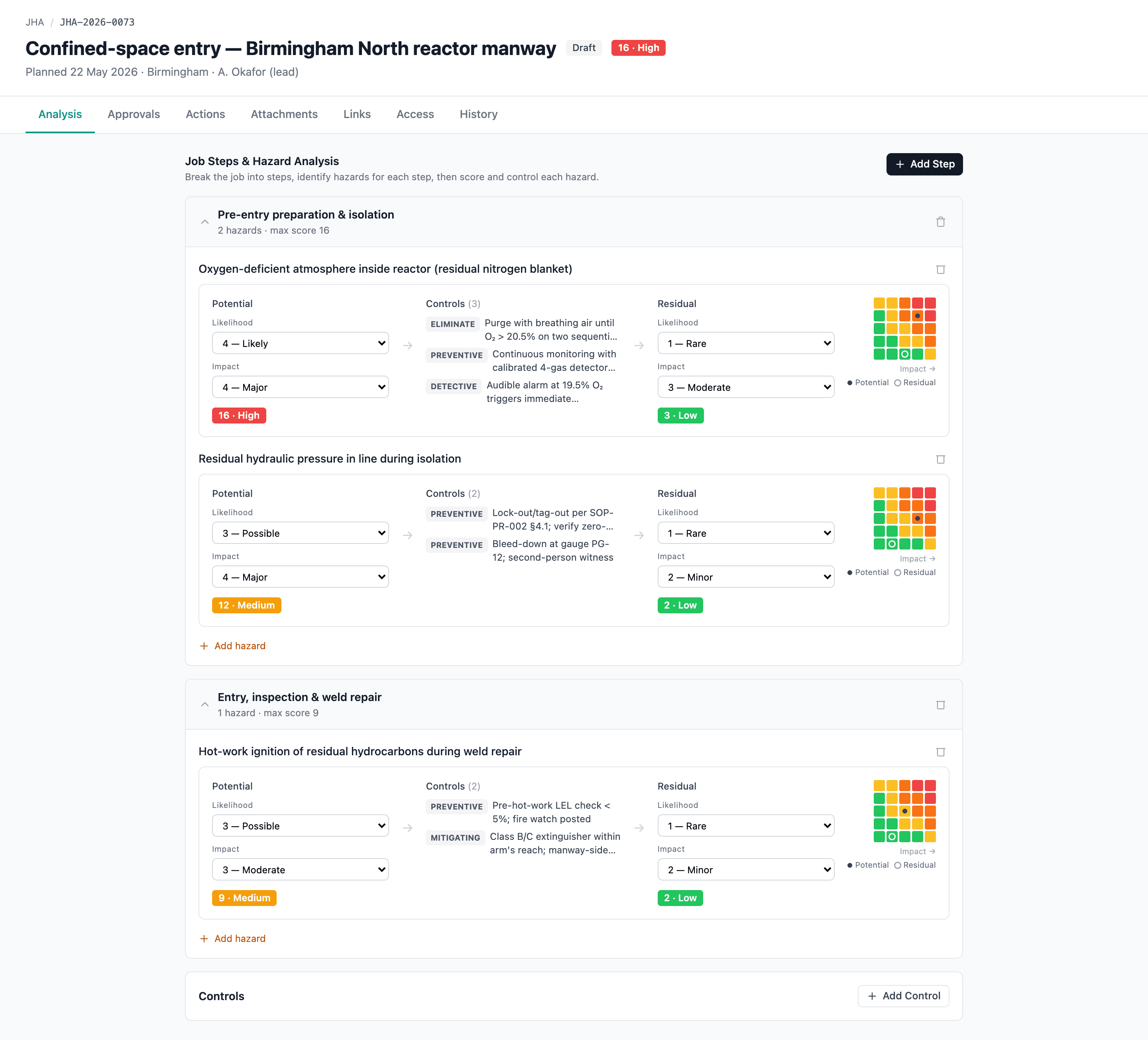
For each task step:
- Describe the step and the potential hazard.
- Score the hazard on the matrix (Likelihood × Impact).
- Add controls — Preventive, Detective, Corrective, Mitigating, Administrative. Controls are managed at the JHA level, not inside each card: the editable controls panel sits at the bottom of the Analysis tab, each hazard card shows a read-only summary of the controls linked to it, and a single control can be linked to one or more hazards via a multi-select.
- Set residual Likelihood × Impact after controls.
Controls reference internal documents (the SOP that implements them) or external references — same component as Risk Register and FMEA. See Risk fundamentals → Controls.
Importing risks from the register
If a hazard is already in the Risk Register, you don't need to re-enter it. Import the risk into the JHA and it pre-populates the hazard card with the score, controls, and document references.
Imported risks are forks — edits here don't affect the register entry. See Risk fundamentals → Importing a risk into another module for the fork semantics.
Approval
JHAs use the shared approval workflow:
- Set approvers (or rely on routing rules).
- Multi-step approval chain — up to 3 steps.
- Delegations supported.
- Routing configurable per JHA at Admin → JHA.
See Approvals for the chain mechanics.
If your organization has Require passkey for approvals turned on, approving a JHA prompts for a fresh passkey confirmation. The confirmation lasts 5 minutes; the approver must have at least one passkey enrolled — see Auth policy and Passkeys.
Versions and revisions
Approving a JHA snapshots its complete content — every task step, hazard, and control — into the Versions tab. That snapshot is the signed-off record an auditor reads; later edits never rewrite it.
To change an approved (or archived) JHA, click New Revision. It returns the JHA to Draft for editing and re-approval, keeps the prior version intact in history, and bumps the major version (1.0 → 2.0) when the revision is re-approved. New Revision requires JHA edit permission, a reason, and — when your org requires passkeys for approvals — a passkey confirmation. It's the same revision flow FMEA uses.
Admin: JHA settings
JHA approval routing is configured at Admin → Approval Routing → JHA tab (the standalone Admin → JHA Settings page now redirects there).
If you delete a JHA
A pre-approval JHA — Draft, Under review, or Rejected — can be deleted from its detail page and lands in Trash for 90 days. Restoring brings the hazards, controls, risk assessments, attachments, and cross-module links back together.
Approved and Archived JHAs are permanent records — the delete button is hidden on them. To remove a terminal-status JHA you'd revert it back to Draft first (logged), then delete from there.
See Soft-delete — how it works.
Finding JHAs in the list
The JHA list page has a filter for every column right in the table header — narrow by subtype, status, scope, and so on, all at once. A count of matching JHAs sits in a footer strip below the table, so you always know how big the set you're looking at is.