In one sentence
Gap analysis turns your compliance map into a defensible assessment — auto-populate pulls the right evidence in for you, AI proposes a first-pass status across every clause, and you finish the judgment calls clause-by-clause.
- Auto-populate is a deterministic scan, not AI. It walks every approved document in your library and links each clause-tagged heading to the matching clause in the assessment. Re-runnable, idempotent.
- AI is optional. It proposes a first-pass status across every clause; you accept or reject each suggestion. Nothing is written without confirmation.
- The depth of your compliance map is the multiplier. Map well and an assessment that used to be a quarter is a sprint.
Creating a gap analysis
- Click New Gap Analysis.
- Pick the standard to assess against (ISO 9001, AS9100D, IATF, etc.).
- Optionally link context documents — extra material the AI can read alongside the compliance-mapped evidence.
- Set facility + department scope.
The detail tabs
| Tab | What lives here |
|---|---|
| Overview | Top-line status, compliance breakdown, access summary |
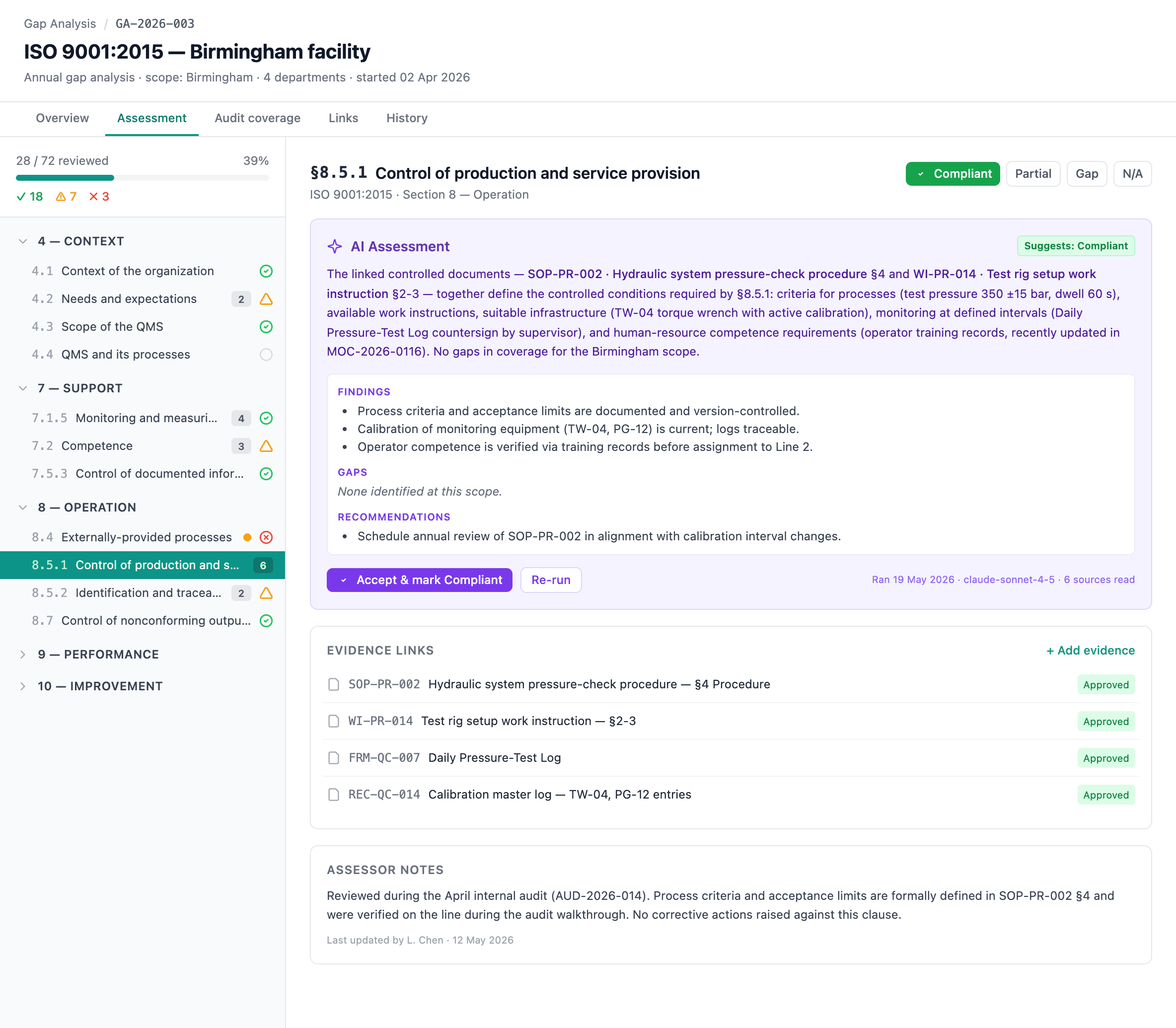
| Assessment | The clause-by-clause grid where the work happens |
| Audit coverage | Clause × department matrix — do we audit what we document? |
| Attachments | Supporting files |
| Links | Connections to other modules |
| History | The unified record-history feed — see Record history |
Per-clause assessment
For each clause:
| Field | Options |
|---|---|
| Status | Compliant / Partial / Gap / Not Applicable / Not Reviewed |
| Notes | Current state, observations, anything an external auditor would want to read |
| Evidence | Linked documents — auto-populated from the compliance map, plus anything you add by hand |
| Actions | Raise gap-closure actions inline; they roll up to the unified Actions register |
| Files | Upload supporting files directly on the clause |
Auto-populate evidence links
Click Auto-populate evidence links to scan every approved controlled document for headings tagged with clauses in this assessment's standard. For each match, a link appears on the corresponding clause.
Properties of the scan:
- Deterministic. No AI. Same inputs → same outputs.
- Idempotent. Duplicates are skipped, so re-running is safe.
- Quality depends on the map. A shallow compliance map produces shallow auto-populate results. See Compliance mapping.
AI workflow
With evidence links in place, the AI can help in two ways:
- Bulk assessment — run AI across every clause at once. It proposes a first-pass status (Compliant / Partial / Gap / N/A) for each clause, drawing on the linked evidence and any context documents you added.
- Per-clause analysis — on any individual clause, click Run AI Analysis for a longer narrative assessment. Useful for the difficult cases.
Both are optional. AI proposals always show as suggestions you accept or reject — nothing is written without your confirmation. AI depends on the org-level master toggle. See AI Features & Settings.
Audit coverage — do we audit what we document?
A standard gap analysis answers "do we have a procedure for this clause?" The Audit coverage tab answers a second, orthogonal question: "do we also have an audit question that exercises that documented requirement?"
The tab renders a clause × department matrix. Each cell is one of three states.
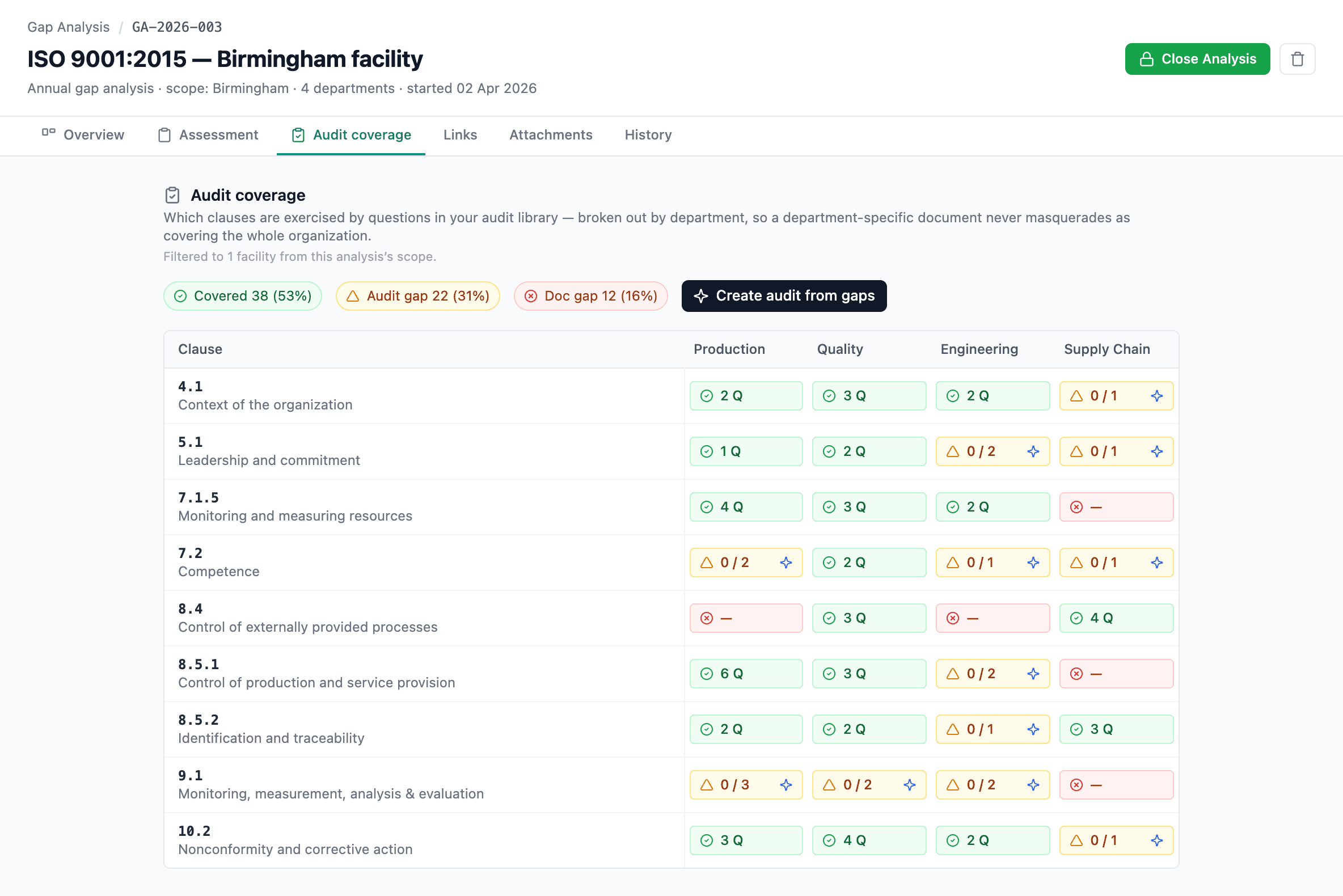
Green — clause is documented and covered by at least one audit question. No action needed.
Amber — clause is documented but no audit question exists. Audit gap. Click Fill audit gap to draft questions with AI.
Red — neither documented nor audited. Documentation gap — the audit-coverage view can't help; you need to write or revise the document first.
The two gap types
| Doc mapped? | Question exists? | Cell color | Meaning | Primary action |
|---|---|---|---|---|
| Yes | Yes | Green | Covered | None (or add more if you want depth) |
| Yes | No | Amber | Audit gap — described but not audited | Fill audit gap (AI) |
| No | No | Red | Documentation gap — neither described nor audited | Write or revise a document; AI is disabled here |
Fill audit gap (AI proposer)
Click Fill audit gap on any amber cell — or use the bulk action to run it across many cells at once. The AI proposer:
- Reads the document section(s) mapped to the clause for that department.
- Drafts a list of suggested audit questions, each citing a specific document section anchor.
- Inherits the standards from the document's existing compliance map and the facility / department scope from the document.
Every proposal lands in a review modal — you edit, accept, or reject each one before anything is written to the question bank. Approved proposals go into the Audits Question Bank as new questions, available for the next audit you scope.
The proposer never writes silently — every question that ends up in your bank was reviewed by a human.
Why two dimensions
A traditional gap analysis tells you whether you describe a requirement. Audit coverage tells you whether you exercise the description. Together they give the full picture:
- A green clause/department cell — you've documented and you're testing the documentation.
- Amber — you've described it but you're not catching drift between what's written and what's done.
- Red — you don't have the procedure at all, so audit coverage isn't even the question yet.
For an org building an audit program from scratch — "give me an ISO 9001 audit for this facility" — the workflow is: ensure the assessment is mostly compliant (green / amber on the Assessment tab), then sweep the amber cells on Audit coverage with bulk Fill, review the proposals, and the question bank for that program is built.
The register
The Gap Analysis list shows each analysis with title, standard, created date, reviewed %, and a breakdown of Compliant / Partial / Gap / N/A counts. The list respects Access Control — restricted analyses are hidden from users who lack access.