In one sentence
Every record in QFormance is scoped to one or more facilities and departments — that's how the system answers "where does this apply?", separately from who can see it (access control) and what people can do (roles & permissions).
- Some modules are single-facility, multi-department (NCR, MOC, Exemptions, FMEA, JHA, Gap Analysis). Some are multi-facility, multi-department (Meetings, Documents, Audits, Risk Register).
- The scope picker is the same widget everywhere — it just adapts to single- or multi-facility shape.
- Switching your active facility changes defaults, not data — nothing moves, only what's pre-selected on new forms.
Single vs multi-facility modules
Most modules scope to one facility at a time. A few span several:
| Shape | Modules |
|---|---|
| Single-facility, multi-department | FMEA, JHA, MOC, Exemptions, NCR, Gap Analysis |
| Multi-facility, multi-department | Meetings, Risk Register, Documents, Audits |
The picker on each module's create / detail page adapts automatically.
The scope picker
A shared Facility + Department picker appears on every create form and on every detail page (so scope can be edited after creation).
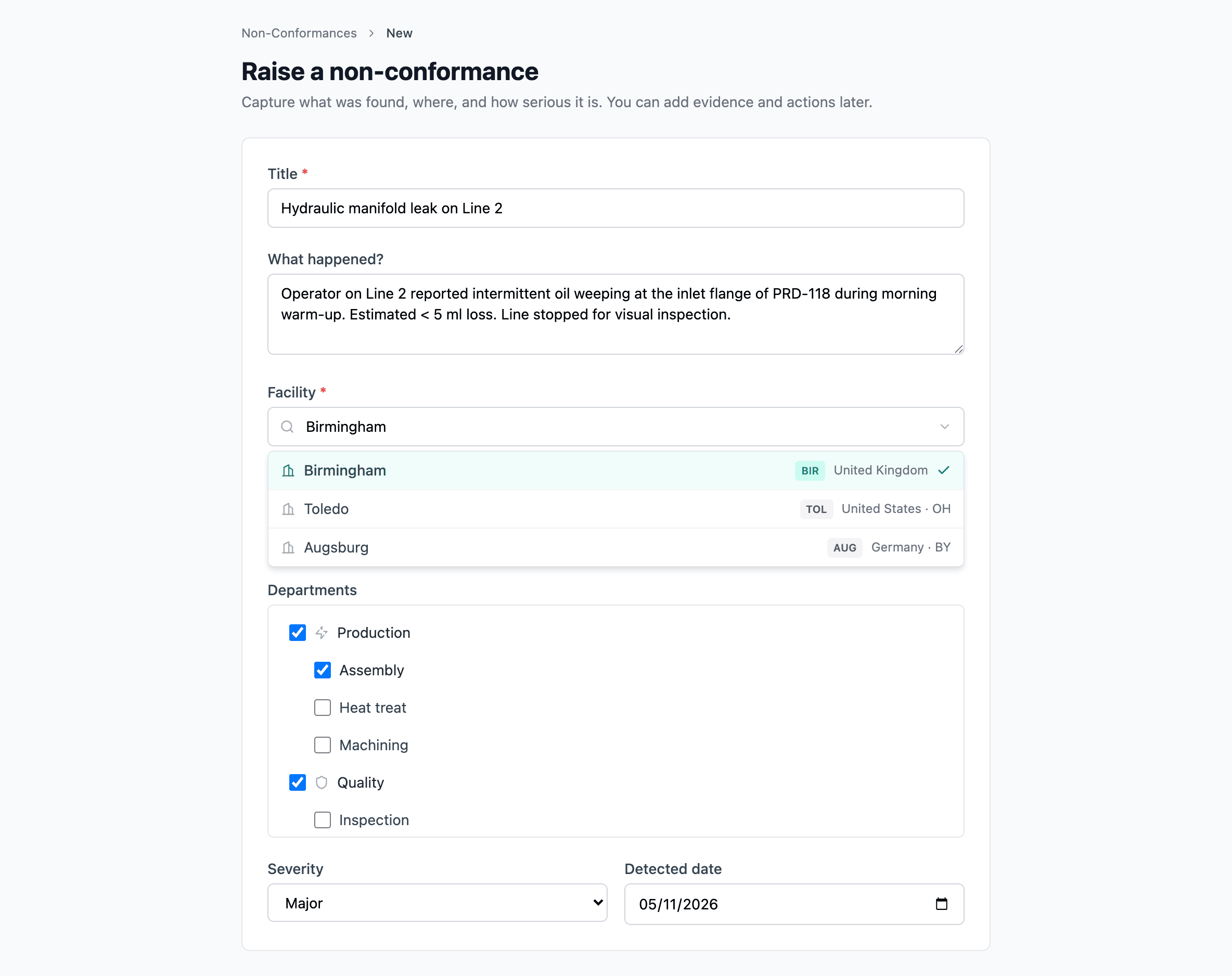
Single-facility variant
A popover trigger shows the currently selected facility's code and name — or Organization (no specific facility) when none is required.
- A search field filters by facility code or name (case-insensitive).
- Options are grouped: Organization-level (where allowed), then facilities.
- After picking a facility, departments load — only the ones that actually exist at that facility.
Multi-facility variant
The trigger shows N facilities selected or All facilities (N).
- Search header plus Select all and Clear buttons.
- Checkboxes for each facility.
- Below the picker, chips render for selections (each removable).
In both variants, departments filter to those that exist at the selected facility or facilities — driven by the topic-to-department mapping at Admin → Auditing → Scope Planner.
On create
The picker appears on every record's new-form with sensible defaults — your active facility from the session is pre-selected wherever the module accepts it.
On the detail page
Every module's detail page surfaces the picker as an inline scope panel. You can update scope after creation without re-entering the record. When the record is in a locked state — approved, closed, archived, rejected — the panel renders read-only.
Active facility (session scope)
Your active facility is set via the top-bar facility switcher. It only affects:
- Default values on new-record forms
- Default list filters across modules
Switching active facility doesn't move any data and doesn't change what you have access to. You can still work with records outside your active facility as long as your role and the record's access list allow it.
Multi-facility records
A record can appear in every facility it's scoped to. A document scoped to three sites shows up on each site's filtered Documents list. Updating scope adds or removes that visibility.