In one sentence
Training reporting is two things in one: a dashboard that tells you whether your team is keeping up with required training, and an inbox that ingests completions from your existing LMS so everything is in one place.
- The dashboard shows completion percentage and median time-to-acknowledge, not just "how many people clicked yes".
- A shallow time-to-acknowledgement curve is the early warning that something's stuck.
- External LMS completions arrive automatically once you connect a source — they appear in users' Completed lists alongside QFormance courses.
The dashboard
Open Admin → Training → Reporting.
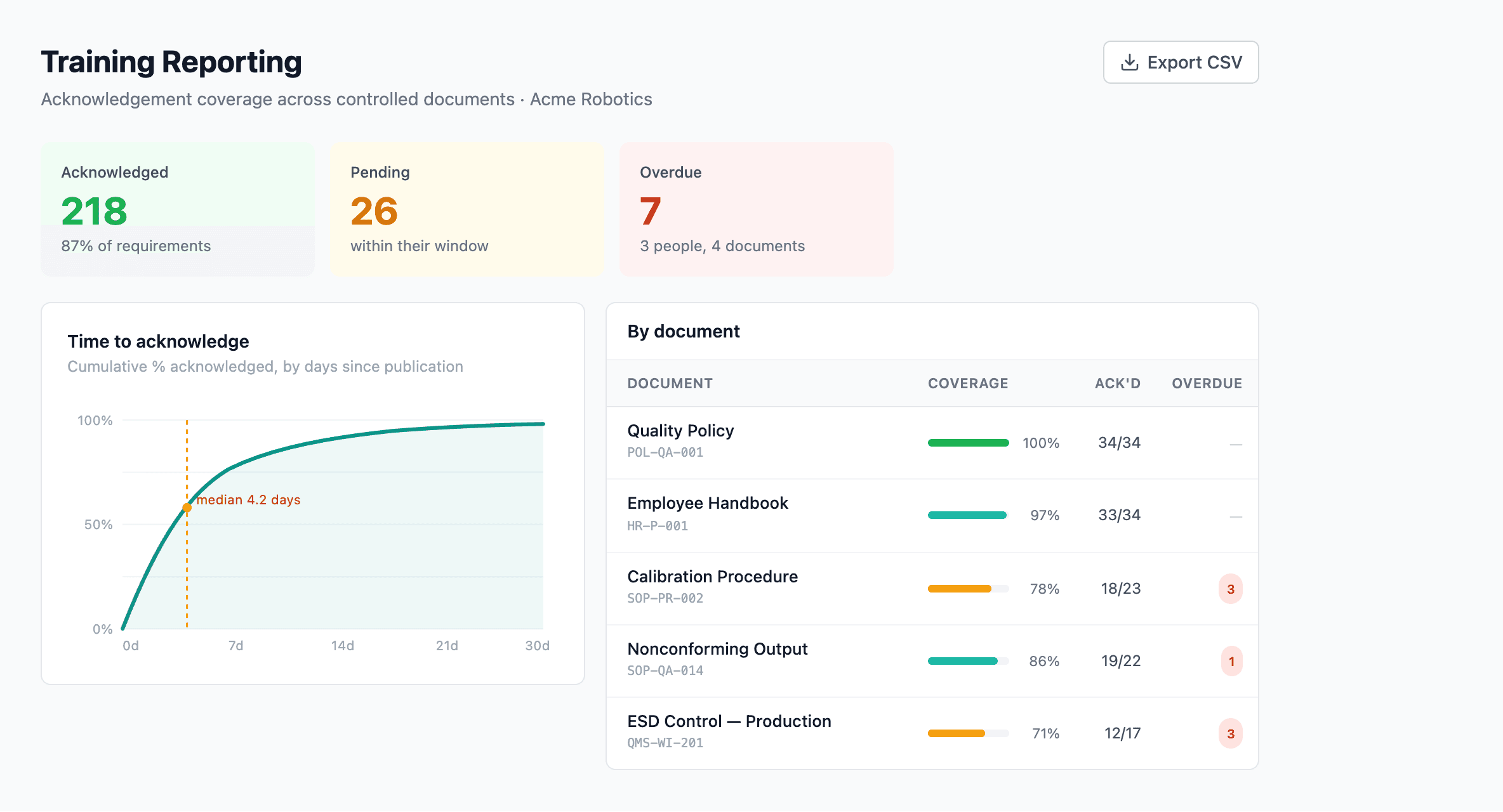
Top stats. Headline numbers — total requirements, completion %, median and 90th-percentile time to acknowledge.
Time-to-acknowledgement trend. A cumulative curve. The closer it leans to the y-axis, the faster your team is responding.
Per-document drill-down. Click any row for the per-learner status on that document.
What the headline numbers mean
| Metric | What it tells you |
|---|---|
| Total requirements | How many active documents need acknowledgement, plus active courses. |
| Completion % | Fraction of distribution-list assignments that have been acknowledged. |
| Median time-to-acknowledgement | Typical turnaround from when a document is distributed to when it's acknowledged. |
| 90th-percentile day | How many days it takes for 90% of acknowledgements to come in. The number you quote when an auditor asks "is everyone trained?" |
The time-to-acknowledgement curve
The curve plots the cumulative fraction of acknowledgements completed by day-since-distribution. A typical healthy curve climbs sharply for the first 5–10 days, then levels off near 100%. A shallow curve — one that takes 30+ days to plateau — is the signal that document changes aren't reaching people quickly enough, or that managers need to nudge their teams.
Per-document drill-down
Underneath the headline metrics, every document that requires acknowledgement is listed with its completion percentage and a link to the per-learner view. That view shows who's acknowledged, who hasn't, and how long it's been since they were assigned.
Retiring stale acknowledgement obligations
A sibling admin page — Admin → Training → Acknowledgements — lists every open document acknowledgement obligation by version and lets you retire one that no newer revision is going to clear (keeping completed records, stopping reminders and prompts for the rest). It's the deliberate way to close a requirement that the reporting dashboard would otherwise keep counting as outstanding. See Document training → Retiring an obligation.
Connecting an external LMS
If your team already runs Moodle, Cornerstone, Articulate Online, or another LMS, QFormance can ingest those completions so people don't end up with two training histories.
The flow is:
Once connected, completions stream in automatically as your LMS processes them.
To register a source: go to Admin → Training → Sources and click New source.
QFormance generates the key, displays it, and never shows it again. If you lose it, regenerate one — but the LMS will need to be reconfigured with the new key. Save it to your LMS and a password manager before you close the dialog.
How most LMSs ask for credentials
Most popular LMSs (Moodle, Cornerstone, Articulate Online) want a username and password when you connect to an external xAPI receiver:
- Put anything in the username field —
qformance,lms, leave it blank, doesn't matter. QFormance ignores it. - Paste your API key as the password.
That's the connection done. From here, a completion in your LMS shows up in QFormance the next time the LMS pushes — usually within minutes.
▸For developers: HTTP details
QFormance accepts two authentication schemes on the xAPI endpoint:
Authorization: Bearer <api_key>
Authorization: Basic base64("anything:<api_key>")
Use Bearer when your LMS lets you set a custom Authorization header. HTTP Basic is required by xAPI 1.0.3 §6.2, which is what Moodle, Cornerstone, and Articulate Online speak. The username portion is ignored — the API key is the password.
Statements arrive as standard xAPI: actor / verb / object / result. They merge into the same training-record store as native QFormance completions. Each source row shows its last-used timestamp so you can confirm the pipeline is live.
Scoping a source to specific courses
Every source key is limited to a list of activity IDs, which you set when you register the source, so a key can only report completions for the courses that system delivers. A key whose list is empty records no completions at all — that alone doesn't disable the key, though (it can still store course bookmark / resume state), so use the Inactive toggle below to stop a source entirely. See External training → Scoping a key to specific activities.
Pausing a source
Flip a source Inactive at any time to stop accepting new completions from it. Existing records stay — only new attempts to send are rejected (with a clear reason, not a bare error code).
What external completions feed
Once a completion has landed from an external source, it counts the same as a native QFormance completion:
- It appears in the user's Training Hub → Completed list.
- It rolls into the Training Reporting stats.
- It's available as audit evidence when an auditor asks did this person complete Training X?