In one sentence
QFormance scores risk in one place — a configurable matrix shared by Risk Register, FMEA, and JHA — and treats imports into MOC, Exemptions, and the rest as forks so each module can adapt without polluting the source.
- One matrix, three modules. Configure the dimensions and thresholds once. Every module that scores risk reads from the same scheme.
- Inherent − residual = what your controls bought you. Score before controls, score after, and the delta is the value of the mitigation.
- Imports are forks, not links. When MOC pulls in a register risk, edits in the MOC don't change the original. The register stays the source of truth.
The shared matrix
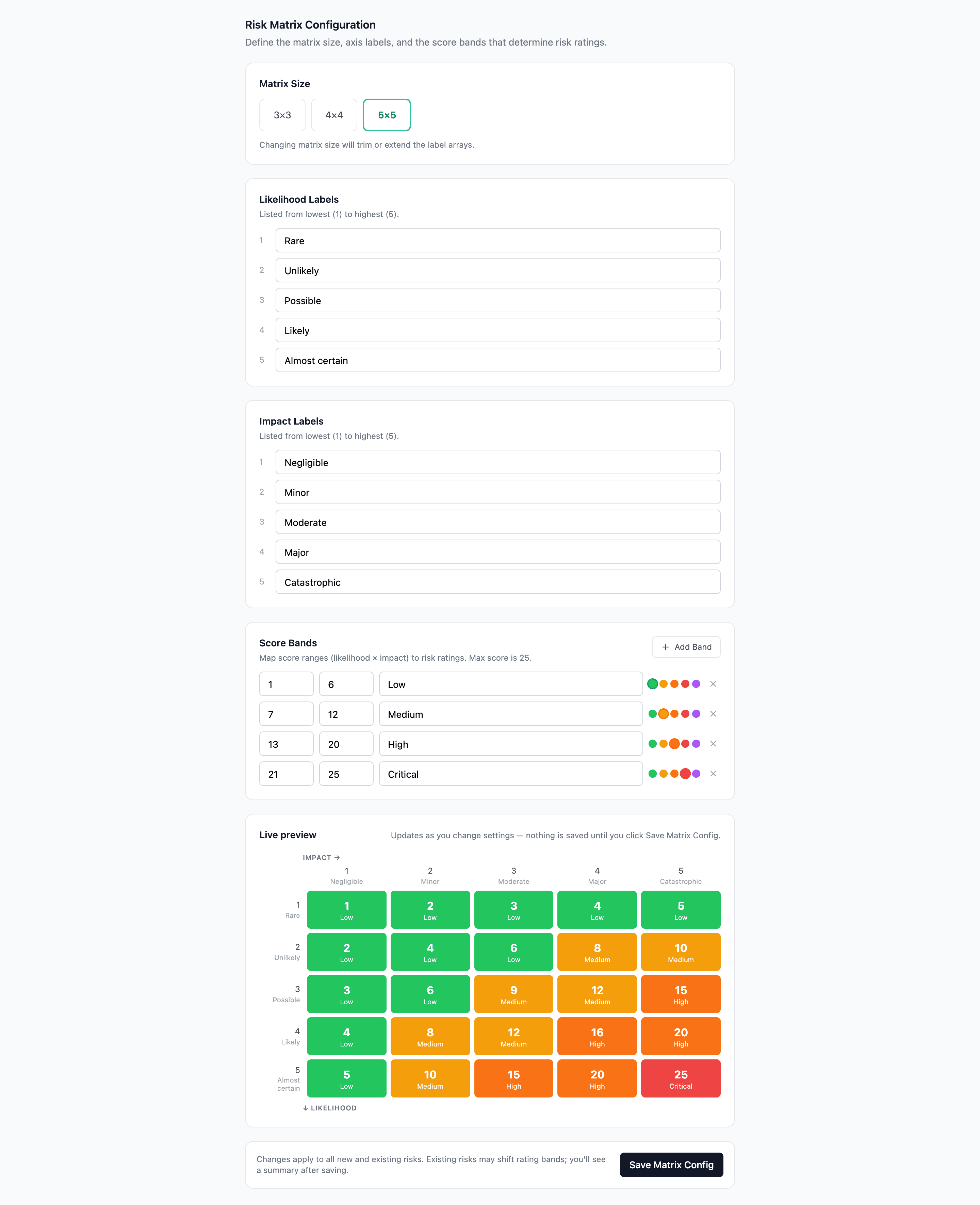
Risk in QFormance is scored on Likelihood × Impact, where the dimensions and thresholds are configured once at Admin → Risk Management and then read from by every module that needs to score risk.
| Setting | Configured at | Used by |
|---|---|---|
| Dimensions (Safety, Quality, Financial, Reputational, etc.) | Admin → Risk Management → Dimensions | Risk Register, JHA, FMEA, MOC, Exemptions |
| Likelihood and Impact scales | Admin → Risk Management → Scales | All scoring surfaces |
| Threshold colors (Green / Amber / Orange / Red) | Admin → Risk Management → Thresholds | All scoring surfaces |
| Matrix size (3×3, 5×5, etc.) | Admin → Risk Management → Matrix | All scoring surfaces |
The 5×5 default works for most orgs. Customize when your scoring scheme is genuinely different — and remember it changes everywhere at once.
FMEA scoring is the matrix plus one extra dimension
FMEA uses the same matrix, plus Detection as a third axis. The product is the Risk Priority Number (RPN):
RPN = Severity × Occurrence × Detection
Severity and Occurrence map to the matrix's Impact and Likelihood dimensions. Detection is unique to FMEA — how likely is it that the failure is caught before it affects a customer? Lower-detection (harder to catch) means higher RPN, even at the same Severity × Occurrence.
See FMEA for the per-row table and revised-RPN flow.
Inherent vs residual scoring
Every risk is scored twice:
| Score | What it captures |
|---|---|
| Inherent | What the risk would be without controls. The bare exposure. |
| Residual | What the risk is after your controls. The mitigated exposure. |
The delta is the visible value of your controls. A small delta means your controls aren't actually buying much; a big delta means they're doing real work.
For FMEA, the equivalent pattern is the revised RPN — score the row, take the action, set revised S / O / D, and the new RPN tells you whether the action moved the needle.
Controls
The same controls component is used by Risk Register, JHA, and FMEA. It supports:
| Type | What it does |
|---|---|
| Preventive | Stops the failure from occurring (training, design changes, interlocks) |
| Detective | Catches the failure when it does occur (inspection, monitoring, alarms) |
| Corrective | Reduces impact once the failure has occurred (recovery procedures, rework) |
| Mitigating | Reduces severity but doesn't fix the root cause (PPE, redundancy) |
| Administrative | Procedural controls — SOPs, work instructions, approvals |
For FMEA, the default subset is Preventive and Detective only — configurable at Admin → FMEA Settings.
Linking controls to documents
Each control can reference:
- An internal document — link to a specific approved version of an SOP, work instruction, or procedure that defines the control.
- An external document — for regulations, customer specs, or industry standards your control is based on.
Internal-document links freeze to the approved version at the time the link was made. If the document is later revised, the control still references the version it was built against — the audit trail is preserved.
If a controlled document a control references is marked Obsolete, the control still works (it points at the frozen version) but the active document picker won't suggest it any more. Keep an eye on this when retiring documents — see Documents.
Risks flow both ways
The register isn't a one-way export. Risks flow out when other modules need to import an existing risk, and flow in when a module discovers a new risk that should be tracked org-wide. Both directions are deliberate; both are recorded in the activity log.
Out of the register: imports as forks
Risks from the Risk Register can be imported into:
- MOC — for the risk assessment on a change
- JHA — as a hazard risk on a task
- FMEA — as a process-step risk
- Exemptions — as the risk assessment on a deviation
When a module imports a register risk, it gets a fork, not a live link.
Each module needs to adapt risks to its context — a register risk imported into a JHA might gain task-specific controls that don't make sense back in the register. Forking keeps the register clean while letting the receiving module do its job.
- Edits in the receiving module don't change the original. The register entry is unaffected.
- The fork knows where it came from. Activity logs reference the source register risk, so reviewers can trace back.
- Scoring stays consistent. The fork is scored on the same matrix — only its content can drift.
MOC and Exemption imports run through one shared fork engine, so a fork is a faithful, complete copy — it carries over the source risk's dimension scores, its controls, and the links between each control and the dimensions it addresses, not just the headline number. The forked risk gets its own register-style number on the facility-aware yearly scheme — RISK-{FACILITY}-{YYYY}-{NNN}, or OPP- for an opportunity — the same format the Risk Register itself issues. (MOC-created assessment risks used to fall back to a legacy RISK-NNN counter; new ones follow the standard scheme, and existing numbers are untouched.)
Into the register: pushing residual risk from an NCR
When a root cause analysis reveals a systemic exposure that should be tracked beyond the lifetime of the NCR, you push it to the register from the NCR's Root Cause Analysis tab — Capture Residual Risk.
What happens when you click the button:
- AI drafts a risk title, description, and 2–4 suggested controls based on the NCR's root cause text, corrective actions, and recorded losses.
- The draft is calibrated against your org's configured monetary thresholds and risk matrix bands — so the proposed risk level (low / medium / high / critical) reflects how your org actually scores risk, not a generic default.
- You can edit the title, description, controls, and risk level before submitting. Re-draft with AI regenerates the suggestion.
- Confirm — QFormance creates a first-class Risk Register entry and an entity link from the NCR to the new risk.
- The NCR's Links tab shows the connection.
The button is disabled until root cause text exists and hidden once the NCR is closed.
Because it's a normal register entry, the risk can be imported (as a fork) into any other module — MOC, JHA, FMEA, Exemptions — using the standard "Import from Register" flow.
- One NCR can drive a register risk and an FMEA refresh and an MOC, all referencing the same source.
- Reviewers see the full chain in the activity log: NCR → register risk → forked module records.
For the full per-NCR walk-through, see Non-conformances → Capture Residual Risk.
Periodic review
Both register risks and JHA hazards have review intervals — set per category at Admin → Risk Management → Categories. Once a risk is past its review date, it surfaces in the relevant register with an overdue review badge.
A periodic review records:
- Who reviewed
- When
- Any changes noted (or no change)
- Optional rescore
The activity log preserves the full review history, so the auditor can see how a risk has evolved over time.
Where each module fits
| Module | What it scores | Best for |
|---|---|---|
| Risk Register | Org-level risks and opportunities | High-level enterprise risk; the source of truth for cross-module imports |
| FMEA | Process steps and failure modes | Process / design risk with the Detection dimension |
| JHA | Tasks and hazards | Task-level safety; ground-floor hazard analysis |
| MOC | A specific change | Risk assessment as part of change-control approval |
| Exemptions | A specific deviation | Risk assessment that drives exemption approval routing |
If a risk is best understood at multiple levels — an enterprise risk that also has a task-level hazard, for example — start in the Risk Register and import into the more specific module from there.
Deleting risk records
Risks, FMEAs, JHAs, MOCs, and Exemptions can all be deleted while they're still in a pre-approval state. Delete sends the record to Trash for 90 days; restore brings it back in full. Approved / closed / archived records in any of these modules are permanent and can't be deleted directly — see each module's article for the specifics.
A risk that's still linked to an open MOC, FMEA, or NCR is blocked from delete until the linkage is cleared. See Soft-delete for the broader pattern.